
The best AI model for creating a beautiful character is not necessarily the best model for creating that same character twenty times.
Character consistency is a different problem.
A model might produce an outstanding portrait but struggle when the same person needs to appear:
- from another camera angle;
- in another outfit;
- inside another location;
- with another expression;
- beside other recurring characters;
- several scenes later;
- eventually inside an AI video.
For visual storytelling, the real question is therefore not simply:
Which AI model creates the best image?
It is:
Which model and workflow preserve the most important parts of a recurring character while still allowing the story to change?
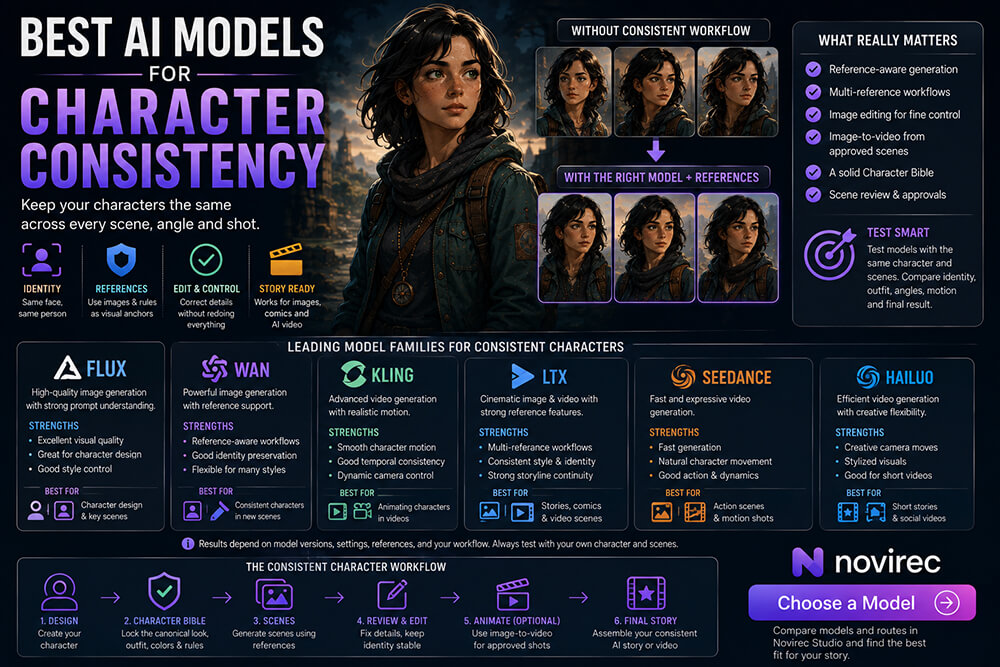
In 2026, the strongest answer is usually not one universal model. It is a combination of reference-aware image generation, multi-reference editing, a canonical character definition and controlled image-to-video animation.
Novirec is built around that provider-neutral approach. Its current public model catalogue includes families such as FLUX, WAN, Kling, LTX, Seedance and Hailuo, while Stories and ordered reference workflows provide an additional continuity layer above individual providers.
Open Novirec Studio to compare the models and routes currently available for your project.
What Makes an AI Model Good at Character Consistency?
Character consistency is not one capability.
It combines several.
A useful model or workflow should preserve as many of these as possible:
| Area | What needs to remain stable |
|---|---|
| Facial identity | Same recognizable person |
| Hair | Length, shape, color and texture |
| Age | No unexplained aging or de-aging |
| Body design | Similar proportions and silhouette |
| Wardrobe | Correct clothes and colors |
| Accessories | Glasses, jewelry, bags and signature items |
| Art style | Same visual universe |
| Camera flexibility | Character survives new viewpoints |
| Prompt control | New action without identity reset |
| Reference control | Ability to reuse approved visual information |
The last point is especially important.
A model that accepts a useful visual reference often has a major advantage over a text-only workflow for recurring characters.
There Is No Single “Character Consistency Score”
When people compare AI models, they often want a simple ranking:
Model A — 9/10
Model B — 8/10
Model C — 7/10
That looks convenient but can be misleading.
A model can perform extremely well for:
same character, similar portrait
and much worse for:
same character, full-body action shot from behind.
Another may preserve the face but change the wardrobe.
Another may be excellent at editing an existing image but less useful for creating completely new compositions.
Character consistency needs to be tested according to the actual production task.
The Four Model Capabilities That Matter Most
For story production, I would divide the problem into four categories.
1. Reference-based image generation
Best when you need:
the same character in a new scene.
2. Multi-reference image editing
Best when you need to combine:
character + outfit + style + location + object references.
3. Image editing and controlled regeneration
Best when:
most of the scene is correct but one detail drifted.
4. Image-to-video
Best when:
the scene image is already approved and you want to add motion without reinventing the whole visual design.
This distinction is more useful than choosing one model for everything.
Best Model Type for Establishing a Character
The first stage is character creation.
At this point, consistency is not yet the main problem because there is only one image.
Your goal is to find the design that will become canonical.
Prioritize:
- image quality;
- prompt understanding;
- facial quality;
- style;
- clothing control;
- useful editing options.
You may generate several candidates.
For example:
Version A
Better face.
Version B
Better outfit.
Version C
Better visual style.
Then choose the version that should become:
the character.
Do not keep all three as competing identities.
Once the design is approved, consistency becomes the objective.
Reference-Aware Image Models Are Usually the Most Important
Suppose your approved protagonist is Maya.
You now need:
Maya walking through Tokyo at night.
A text-only prompt may say:
Maya, 24-year-old woman with short black hair, green jacket…
But the model still has to reinterpret Maya.
A reference-aware workflow can provide the actual approved visual identity.
That changes the task.
Instead of:
Create someone who fits this description.
the model gets:
Use this visual identity inside this new scene.
That is why reference support is often more important for story consistency than raw text-to-image benchmark quality.
Novirec’s current image workflow supports ordered multi-reference editing, and its public documentation specifically positions references and Character Bibles around improving identity, clothing, style and scene continuity.
FLUX for Character-Centered Image Creation
The FLUX family is one of the model families currently surfaced inside Novirec’s public catalogue.
For character-story workflows, FLUX-class image generation is most useful during stages such as:
- initial character design;
- polished story illustrations;
- scene creation;
- visual iteration;
- reference-guided image workflows where supported by the active route.
The key distinction is not simply the name FLUX.
What matters is whether the particular route available to you supports the kind of reference or editing control required for that scene.
A high-quality text-to-image route may be excellent for designing your protagonist.
A reference/edit route is usually more relevant once that protagonist must persist.
Best use
Character creation and high-quality scene imagery.
Less ideal use
Treating every scene as an unrelated text-to-image prompt and expecting the name of the character alone to preserve identity.
Multi-Reference Workflows Can Matter More Than the Base Model
Imagine you need this scene:
Maya wearing her approved expedition outfit while holding the specific artifact introduced earlier, inside the same laboratory seen in scene four.
There are several continuity requirements:
Reference 1
Maya.
Reference 2
Expedition outfit.
Reference 3
Artifact.
Reference 4
Laboratory.
A multi-reference workflow gives the generation much richer information than one enormous text prompt.
That is one reason Novirec uses ordered references rather than treating every visual input as an interchangeable image.
The relevant question becomes:
What is each reference responsible for preserving?
That is much more scalable for complex stories.
Character Bible + Model Is Stronger Than Model Alone
Even an excellent reference-capable model still needs to know which visual version is authoritative.
That is where the Character Bible becomes useful.
For example:
Maya — Canonical
Hair: short black bob
Eyes: brown
Jacket: teal
Boots: dark brown
Accessory: silver compass
Default state: clean outfit
Now imagine scene eight occurs after she falls into mud.
The correct character is:
same Maya + muddy version of the teal jacket.
Without continuity information, the workflow may interpret a clean reference as meaning:
clothing must always remain clean.
The Character Bible helps separate:
identity
from:
story state.
The model produces pixels.
The Story workflow defines what those pixels are supposed to represent.
Best AI Model for Character Editing
Sometimes the scene is already 90% correct.
You do not want another full generation.
Example:
- face correct;
- location correct;
- composition correct;
- clothing correct;
- necklace missing.
Generating the entire scene again introduces unnecessary risk.
A controlled edit workflow is preferable.
You want:
preserve everything except the missing necklace.
For character consistency, strong editing can therefore be more valuable than generating endless alternatives.
This is an important principle:
The best consistency generation is sometimes the generation you do not redo.
Fix the smallest broken element whenever the workflow allows it.
Best Model Type for Multiple Characters
Two recurring characters are harder than one.
Five are much harder.
Suppose a scene contains:
Maya
Black hair, teal jacket.
Leo
Blond hair, orange vest, glasses.
Nora
Long red braid, dark coat.
The model needs to maintain three separate identities while also understanding:
- pose;
- position;
- interaction;
- environment.
Multi-reference and editing capabilities become increasingly important as cast size grows.
Strong character design helps too.
If all three characters have similar hair, clothes and silhouettes, even technically good outputs can become ambiguous.
Use distinctive visual anchors.
Image-to-Video Is Often the Best “Video Model Strategy” for Consistency
Now suppose your image model produced the perfect story scene.
Maya is correct.
Leo is correct.
The room is correct.
The important artifact is correct.
The composition is approved.
You could now ask a text-to-video model to rebuild everything from a prompt.
That means reopening all those visual decisions.
A more controlled strategy is often:
Approved story image → Image-to-video
Now the video model starts from an established visual state.
Novirec currently supports both text-to-video and image-to-video creation methods, along with motion prompts, duration, resolution, audio and camera controls.
For consistency-sensitive story shots, image-to-video is therefore often the more useful starting point.
LTX for Story and Reference-Based Production
LTX is another model and production family represented in Novirec’s current public catalogue.
LTX Studio’s own current documentation emphasizes reference images and reusable Elements specifically for keeping visuals consistent across projects, while integrating those assets into storyboards and video workflows.
That reflects a broader lesson about AI storytelling:
Character consistency is rarely solved at the raw generation layer alone.
It improves when the model operates inside a system that understands:
- reusable characters;
- scenes;
- references;
- storyboards;
- approved visual states.
Best lesson to apply
Treat the character as a reusable production asset rather than repeatedly rebuilding it from prose.
Kling, Seedance, WAN and Hailuo for Character Animation
Novirec’s current model catalogue also exposes video-oriented model families including Kling, Seedance, WAN and Hailuo, subject to the routes and configurations available in Studio.
For character consistency, the fundamental decision remains:
What do you give the video model as its starting information?
If the shot contains your important recurring protagonist, an approved image can be more useful than asking the video model to independently establish the protagonist again.
When comparing video models for a recurring character, test:
- facial stability;
- identity through movement;
- clothing preservation;
- hand/body stability;
- camera motion;
- first-frame adherence;
- drift near the end of the clip.
Do not judge only the prettiest frame.
Watch the entire shot.
Seedance, Kling or LTX: Which Is Best?
There is no responsible universal answer without specifying:
- model version;
- exact route;
- source image;
- resolution;
- duration;
- motion complexity;
- provider configuration.
Model catalogues also change quickly.
A better production strategy is to run a controlled test.
Use the same approved scene.
Then generate the same motion using several candidate models.
Example motion:
Maya slowly turns toward the glowing doorway. Her hair and jacket move gently in the wind. Subtle camera push forward.
Compare:
Identity
Same Maya?
Face
Stable during rotation?
Outfit
Correct throughout?
Motion
Natural?
Environment
Stable?
Final frame
Still usable?
Cost
How many credits?
This test tells you much more than a generic internet ranking.
The Best Model Can Change from Scene to Scene
This is another reason Novirec’s multi-model architecture is useful.
Scene one may need:
highly controlled portrait animation.
Scene two:
wide environmental movement.
Scene three:
fast action.
Scene four:
subtle emotional close-up.
One model may outperform another depending on the task.
A provider-neutral workflow lets you choose based on the shot rather than locking the entire story to one provider.
Novirec explicitly describes its platform as provider-neutral and designed to let creators compare and combine multiple models inside one workflow.
Our Practical Ranking for Character Consistency
Instead of pretending one provider universally wins, here is the ranking I would use by workflow type.
| Rank | Workflow | Character consistency value |
|---|---|---|
| 1 | Canonical reference + multi-reference image workflow | Highest control |
| 2 | Controlled image editing of approved scenes | Excellent for correcting drift |
| 3 | Approved image → image-to-video | Strong for animated stories |
| 4 | Reference-aware new scene generation | Strong when new composition is needed |
| 5 | Text-only generation using stable character description | Useful but more variable |
| 6 | Independent text-to-video for every scene | Highest consistency risk |
This table is more useful for a real project than:
Provider X wins everything.
Best Workflow for an Illustrated Story
For an illustrated story:
1. Character design
Choose an image model that produces the desired look.
2. Character Bible
Lock the canonical identity.
3. Reference-based scene creation
Reuse character information.
4. Edit drift
Correct individual problems rather than rebuilding scenes unnecessarily.
5. Approve
Only accepted scenes become part of the story.
Animation is unnecessary unless the project later becomes a video.
Best Workflow for an AI Comic
Comics require even stronger control because several panels may appear next to each other.
Use:
Character Bible
↓
strong character references
↓
panel generation
↓
adjacent-panel comparison
↓
targeted correction
Check:
- face;
- hairstyle;
- wardrobe;
- accessories;
- silhouette.
The “best model” for a comic is therefore not simply the one that creates the prettiest panel.
It is the one that works best inside a repeatable panel workflow.
Best Workflow for an AI Video Story
For video:
1. Establish the character with an image model
↓
2. Create a Character Bible
↓
3. Produce each scene as an approved image
↓
4. Animate important scenes through image-to-video
↓
5. Review identity throughout the clip
↓
6. Assemble
This separates:
visual identity generation
from:
motion generation.
That can be much easier to control than asking the video model to solve everything at once.
Why Text-to-Video Is Harder for Recurring Characters
Consider two prompts:
Scene 1
Maya walks into the abandoned station.
Scene 2
Maya discovers an underground tunnel.
A human understands that Maya must be the exact same person.
A text-to-video model receives another generation request.
Unless the workflow supplies strong identity information, “Maya” is mostly a label.
The model can reinterpret:
- face;
- clothes;
- age;
- hair.
That does not make text-to-video bad.
It means it is solving a different problem.
For isolated cinematic clips, freedom can be an advantage.
For a protagonist appearing twenty times, that freedom becomes risk.
Test Models with a Character Consistency Benchmark
You can create a simple benchmark for your own project.
Take one approved character and generate five scenes.
Test 1 — Portrait
Neutral three-quarter view.
Test 2 — Different location
Character inside a café.
Test 3 — Full body
Character walking outdoors.
Test 4 — Profile
Side view.
Test 5 — Difficult scene
Character interacting with another person.
Then score each output.
| Criterion | Score |
|---|---|
| Face | /10 |
| Hair | /10 |
| Outfit | /10 |
| Accessories | /10 |
| Proportions | /10 |
| Style | /10 |
| Prompt accuracy | /10 |
| Overall identity | /10 |
Now compare models using your character, not somebody else’s benchmark.
Do Not Ignore Cost
Character consistency often requires iterations.
A model that costs twice as much but succeeds immediately may ultimately be cheaper than a low-cost model requiring six retries.
Think in terms of:
cost per approved scene
rather than:
cost per generation.
For example:
Model A
5 credits per attempt.
Average four attempts.
20 credits per approved scene.
Model B
12 credits per attempt.
Average one successful attempt.
12 credits per approved scene.
Model B looks more expensive in a pricing table but may be cheaper for actual production.
Novirec calculates route-aware quotes based on the selected provider, model, references and other settings before generation.
Speed Matters Too
For character development, you may prefer a faster model during exploration.
Once the design is approved, you might choose a more expensive or controlled route for final scenes.
This creates a useful two-stage workflow.
Exploration
Fast + inexpensive.
Generate possibilities.
Production
Higher control + quality.
Generate approved assets.
You do not necessarily need the premium model for every experiment.
Quality vs Consistency
These are not identical.
Imagine:
Model A
Image quality: 10/10
Character consistency: 6/10
Model B
Image quality: 8.5/10
Character consistency: 9/10
For a single promotional portrait:
Model A may win.
For a 30-panel comic:
Model B may be dramatically more useful.
Choose according to the project.
Style Consistency Matters Too
Suppose the face remains correct but:
Scene 1 looks like graphic novel art.
Scene 2 looks photorealistic.
Scene 3 looks like watercolor.
That is still an inconsistent story.
When evaluating models, also test whether they preserve:
- rendering style;
- texture;
- contrast;
- palette;
- lighting language;
- character design conventions.
Character identity exists inside a visual world.
Clothing Is an Underrated Benchmark
Many users focus only on the face.
For stories, wardrobe can matter almost as much.
Test:
Can the model preserve the protagonist’s exact jacket across five different scenes?
If not, the viewer may perceive drift even when the face looks good.
Use distinctive wardrobe as a consistency anchor.
For example:
teal utility jacket with orange shoulder patch.
That is easier to verify than:
normal dark jacket.
Accessories Are Another Useful Test
Use a character with one signature object.
Examples:
- red scarf;
- silver necklace;
- round glasses;
- distinctive backpack.
Then generate several scenes.
Does the object:
- remain present?
- stay the same color?
- remain attached to the right character?
- avoid changing shape?
This quickly reveals how well a workflow handles continuity.
Multiple Characters Are the Real Stress Test
After your protagonist works alone, test two recurring characters together.
Then three.
This often exposes limitations much faster.
The model must maintain separate identities without blending attributes.
For example:
Maya
Black hair + teal jacket.
Leo
Blond hair + orange jacket.
Watch for:
- clothing swap;
- hair swap;
- facial blending;
- incorrect accessories.
A production-ready workflow needs to handle the cast, not just one portrait.
The Best Character Model Is Not Necessarily the Best Video Model
This is one of the most important conclusions.
You can use one model to establish:
what the character looks like
and another model to determine:
how the character moves.
That separation is useful.
You do not need one provider to dominate every stage.
Novirec’s current platform philosophy is specifically to bring multiple image and video model families into one Studio rather than force every creative task through one model.
Recommended Character Consistency Strategy in Novirec
For an important recurring protagonist:
1. Generate the character
Use the image route that gives you the strongest design for your intended style.
2. Approve one canonical version
Do not keep competing identities.
3. Build the Character Bible
Appearance, outfit, palette, references and continuity rules.
4. Use references for new scenes
Preserve identity while changing action and environment.
5. Review every major scene
Catch drift immediately.
6. Edit instead of rebuilding when possible
Preserve everything already correct.
7. Approve the still image
Only then move to motion.
8. Compare video models when necessary
Use the same approved image and motion brief.
9. Select the best result for that shot
You are not required to use one video model for the entire project.
Common Model-Selection Mistakes
Choosing from leaderboard scores alone
Benchmarks may not test your character-consistency use case.
Assuming the newest model automatically wins
New capabilities do not guarantee better identity preservation for your project.
Ignoring reference support
Raw quality is not enough for recurring characters.
Using text-to-video for every story shot
Consider approved image-to-video for important recurring characters.
Regenerating everything when one detail is wrong
Use editing when available.
Testing only portraits
Try full body, profile, action and multi-character scenes.
Ignoring cost per approved result
Cheap failed generations are still expensive.
Locking the entire project to one provider too early
Different scenes can benefit from different strengths.
Frequently Asked Questions
What is the best AI model for consistent characters?
There is no universal best model for every visual style and workflow. Reference-aware image generation and multi-reference editing are generally more important for recurring characters than text-only generation, while image-to-video can help preserve an already approved visual state when moving into animation.
Is FLUX good for consistent AI characters?
FLUX is one of the image model families currently available through Novirec. Its usefulness for consistency depends on the specific generation or reference/edit route being used. For recurring characters, reference control is generally more important than simply selecting the family name.
What is the best AI video model for consistent characters?
The answer depends on the source image, movement, duration and model version. For important recurring characters, test candidate video models from the same approved image and compare identity throughout the entire clip rather than relying on generic rankings.
Is image-to-video better for character consistency than text-to-video?
For continuity-sensitive story shots, it often offers more control because the initial character appearance and composition are already defined. However, identity can still drift during complex motion.
Can I use different AI models in the same story?
Yes. A multi-model workflow can use different models for character design, editing, scene creation and animation. Novirec is designed around provider-neutral model routing rather than requiring one model for the entire project.
Do reference images guarantee perfect consistency?
No. They provide stronger visual information but generative variation can still occur. Scene review and targeted correction remain important.
Should I train a custom character model?
For some high-volume projects, dedicated training may make sense. But many visual-story workflows can first try Character Bibles, strong visual references, multi-reference editing and scene-by-scene approval without introducing a separate training pipeline.
The Best AI Model Is the One That Fits the Workflow
Character consistency is not won by typing the same character description twenty times.
And it is rarely solved by finding one mythical model that handles every possible scene perfectly.
A stronger approach is:
choose the character
↓
lock the canonical identity
↓
use references
↓
generate controlled scenes
↓
correct drift
↓
approve
↓
animate from approved visuals
↓
choose models according to the task
This changes the question from:
“Which AI model is best?”
to:
“Which model gives me the most control at this stage of the story?”
That is the more useful question for illustrated stories, comics and multi-scene AI videos.
Novirec currently brings multiple leading model families into one workspace specifically so creators can choose according to quality, speed, references and budget rather than rebuilding the entire workflow for every provider.
Create an AI Image with Novirec and test your character across multiple visual scenarios.
Building a complete multi-scene project? Create a Story and establish your Character Bible before producing the full sequence.
Want to compare available plans and generation credits? View Novirec Pricing.
Ready to put this workflow into practice?
Open Novirec Studio and start creating with the same tools covered in this guide.