
You have an idea for an AI story.
Maybe it needs one character, eight illustrated scenes and a few animated shots.
Then comes the practical question:
How many AI credits will this actually use?
There is no responsible answer such as:
“Every image costs 10 credits and every video costs 50.”
Different AI models have different underlying costs. Video duration matters. Resolution matters. Reference images can matter. Even two generations that appear similar from the outside may use different providers or routes.
That is why Novirec uses generation credits with a quote shown before a job is launched rather than pretending every AI operation costs the same amount.
The useful question is therefore not:
How much does one AI story cost?
It is:
Which parts of my story require generation, and what will each generation cost before I launch it?
This guide explains how to think about AI story credits, estimate a project and avoid wasting generation capacity.
View Novirec Pricing or, if you already have an account, manage your plans and credits inside Studio.
What Are AI Generation Credits?
Credits are an internal unit used to pay for AI generation operations.
Instead of displaying several different external provider prices throughout the interface, the platform converts supported generation routes into a common credit system.
For example, a project might involve:
Image generation
Creating the initial protagonist.
Image editing
Correcting the protagonist’s clothing.
Story scenes
Creating several connected images.
Image-to-video
Animating selected scenes.
Each operation can require a different amount of computing or provider usage.
Credits provide one consistent way to represent that usage inside the platform.
Why Doesn’t Every Generation Cost the Same?
Because the underlying AI work is not the same.
Consider two requests.
Request A
Generate one standard image.
Request B
Generate a high-resolution video from an image with a longer duration and a more expensive video model.
It would make little sense for both to consume the same amount.
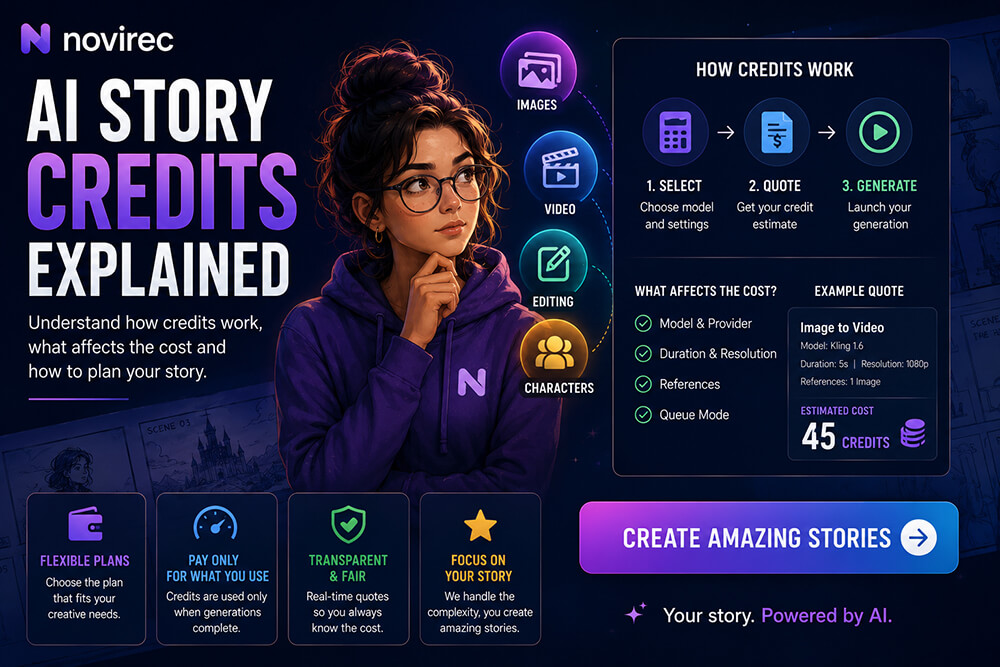
Novirec currently calculates a route-aware quote before generation based on factors including the selected provider, model, duration, resolution, references and queue mode.
That means the credit value you see is connected to the actual route selected for the generation.
The Most Important Concept: Quote Before Generation
This is the part users should understand first.
Novirec’s approach is:
Choose generation settings
→
Receive the credit quote
→
Decide whether to generate
→
Launch the job
The cost should therefore not appear as a surprise after the generation has already finished.
Novirec’s public product description specifically highlights live credit quotes before generation for both image and video workflows.
For budgeting, this is much more useful than trying to memorize a permanent cost table for AI models that continually change.
What Determines the Credit Cost?
Several variables can affect the quote.
| Factor | Why it can affect cost |
|---|---|
| AI model | Different models have different provider costs |
| Provider | The same type of task may use a different route |
| Image/video | Video is generally more compute-intensive |
| Duration | Longer videos can require more generation resources |
| Resolution | Larger outputs may cost more |
| References | Some reference-aware workflows use different routes |
| Queue mode | Fast or lower-priority routing can have different economics |
| Generation method | Text-to-video, image-to-video and editing are different operations |
This is why a statement such as:
“5,000 credits equals exactly 100 videos”
would be misleading.
The real quantity depends on which videos you create.
Novirec’s own pricing page explicitly says generation quantities should be treated as “up to” estimates rather than fixed promises because models and settings consume different amounts.
Current Novirec Credit Plans
At the time of writing, Novirec’s public pricing page lists three monthly tiers.
| Plan | Monthly credits |
|---|---|
| Starter | 1,000 credits |
| Creator | 5,000 credits |
| Pro | 12,000 credits |
The current public prices shown are $9/month for Starter, $28/month for Creator and $60/month for Pro.
Pricing can evolve, so always use the live Novirec Pricing page rather than treating an older article or screenshot as the final source of truth.
Can You Buy More Credits?
Yes.
Novirec’s public pricing currently also presents optional one-time credit packs separately from monthly plans. Availability depends on the active payment adapter and distribution configuration.
This is useful when your normal subscription is sufficient most months but one larger project requires additional generation capacity.
Instead of changing your entire plan permanently, a credit pack can provide temporary additional capacity.
How Many Credits Does an AI Story Need?
There is no fixed answer because an AI story is not one generation.
A visual story can include:
Character exploration
Several possible protagonist designs.
Character references
One or more approved reference images.
Scene images
Perhaps six, ten or twenty scenes.
Corrections
Some scenes may need editing or regeneration.
Animation
Only selected scenes may become video.
Alternative takes
Important shots may require more than one attempt.
That means story cost is best estimated as a production budget.
A Simple Story Budget Formula
Think in terms of:
Character work
Scene generation
Revisions
Video animation
=
Total project credits
For example, imagine an eight-scene story.
You create:
2–4 exploratory character generations.
Then:
8 final scene images.
Perhaps:
3 scenes require one additional correction.
Then:
4 scenes become video.
You do not need to know the exact total before opening Studio.
Once you choose the models and settings, the quote for each operation provides the real numbers.
The important part is understanding how many operations your workflow is likely to contain.
Estimate the Story Before You Generate Everything
A simple planning table can prevent unnecessary spending.
| Story component | Planned amount |
|---|---|
| Main characters | 1 |
| Character exploration | 3 generations |
| Final story scenes | 8 |
| Revision allowance | 3–5 |
| Animated scenes | 4 |
| Alternate video takes | 2–4 |
| Final project | 1 story |
This does not predict the exact credit amount.
It predicts the number of decisions likely to require AI generation.
Then Studio provides the route-specific quote.
That combination gives you a much more realistic production estimate.
Credits Should Be Measured Per Approved Result
This is one of the most important concepts when comparing AI generation costs.
Do not only compare:
credits per generation.
Compare:
credits per approved result.
Imagine two hypothetical models.
Model A
Cost: 5 credits per attempt.
But it takes four generations before you obtain something usable.
Effective cost:
20 credits per approved result.
Model B
Cost: 12 credits.
But the first output is usable.
Effective cost:
12 credits per approved result.
The apparently more expensive model was actually cheaper.
This matters enormously for stories because the same character may appear repeatedly.
Quality, prompt adherence and reference control can reduce regeneration.
The Cheapest Generation Is Not Always the Cheapest Workflow
Suppose you select the lowest-cost image model for every scene.
But:
- faces drift;
- clothing changes;
- reference adherence is weak;
- you regenerate constantly.
You may spend more credits overall than if you had selected a stronger route from the beginning.
A better optimization target is:
cost × number of attempts required
not:
lowest visible quote.
The same logic applies to AI video.
A slightly more expensive image-to-video model that produces a usable first shot can outperform a cheaper route that requires multiple retries.
Character Preparation Can Save Credits Later
Character consistency is not only a quality feature.
It can also affect production efficiency.
Imagine generating twelve scenes before deciding exactly what the protagonist looks like.
Then you realize:
scene one uses the wrong jacket.
If the same incorrect jacket appears in ten later scenes, the correction becomes much larger.
A more efficient workflow is:
Character design
→
Approve canonical appearance
→
Generate scenes
Novirec Stories uses Character Bibles and reference workflows specifically to establish recurring character identity before large-scale scene production.
That can reduce unnecessary iterations later.
Approve Images Before Spending Credits on Video
Video generation generally introduces another production stage.
So before animating a scene, ask:
Is the still image already correct?
Check:
Character identity
Same protagonist?
Clothing
Correct outfit?
Composition
Correct camera framing?
Props
Everything that needs to be present?
Location
Correct environment?
Continuity
Does it match the previous story state?
If the still scene is wrong, fix it first.
Otherwise you may spend credits animating something you already know needs to be replaced.
Image-to-Video Can Be a Cost-Control Strategy
Suppose an approved image already contains:
- correct character;
- correct wardrobe;
- correct environment;
- correct framing.
Using it as an image-to-video source lets you preserve much of that established visual information while adding motion.
The alternative would be asking text-to-video to reinvent all those elements.
That may still work, but it introduces additional uncertainty.
Novirec currently supports both text-to-video and image-to-video creation methods.
For important recurring-character scenes, solving visual composition first can reduce waste.
Not Every Story Scene Needs Video
This is another powerful budgeting decision.
Suppose your story has twelve visual scenes.
You do not necessarily need twelve AI video clips.
Perhaps:
Scenes 1, 3, 7 and 12
need significant animation.
The others could work as:
- still illustrations;
- subtle motion;
- transitions;
- narration-backed images.
This can lower generation requirements while still producing a compelling narrative.
Spend the highest-cost generation where motion actually contributes something.
Use Narration to Compress Expensive Story Events
Consider this story information:
“They traveled for five days through the desert.”
You could create five separate animated travel scenes.
Or you could show one or two strong visuals while narration communicates the time jump.
That is not merely a cost-saving technique.
It can also improve storytelling.
Not every sentence deserves a generated video shot.
Separate Exploration from Production
A useful credit strategy has two phases.
Exploration
You are testing:
- character ideas;
- styles;
- compositions.
Use faster or more economical routes where appropriate.
Production
The visual direction is approved.
Now spend more selectively on:
- final scenes;
- difficult character shots;
- video;
- high-value outputs.
This prevents premium generations from being spent on ideas you may discard five minutes later.
Do Not Generate Ten Alternatives by Habit
More options can feel productive.
But generation without a decision strategy can consume credits quickly.
Instead of automatically generating ten versions, try:
Generate
→
Evaluate
→
Identify the problem
→
Change one variable
→
Generate again
For example:
Face good, composition bad.
Change composition.
Not:
regenerate everything randomly five more times.
Iteration becomes more efficient when each generation has a reason.
Editing Can Be Cheaper Than Rebuilding
Imagine a story scene where everything is correct except one missing accessory.
The scene has:
- right character;
- right location;
- right lighting;
- right composition.
Starting again risks losing all four.
A targeted editing workflow can be more efficient when available.
The broader Novirec platform includes image generation, editing and ordered multi-reference workflows in the same Studio.
The objective is to preserve what is already working.
Credits and Multiple AI Models
One advantage of a multi-model environment is that you do not necessarily need the same model for every operation.
One route may be suitable for:
rapid character exploration.
Another:
detailed final illustration.
Another:
image editing.
Another:
animation.
Novirec currently surfaces model families including FLUX, WAN, Kling, LTX, Seedance and Hailuo, with the stated goal of choosing according to quality, speed, references and budget.
That lets cost become one of several routing decisions rather than the only factor.
When Should You Choose a More Expensive Model?
Consider spending more when the output has high downstream value.
For example:
Canonical character reference
Worth getting right.
Every later scene may depend on it.
Hero scene
Appears on the cover or thumbnail.
Quality matters.
Difficult multi-character scene
A stronger model may reduce retries.
Final cinematic shot
May deserve higher production quality.
You can use less expensive exploration routes around those critical points.
Think of your credits like a production budget.
Not every shot deserves the same spend.
When Should You Use a Faster or Cheaper Route?
Lower-cost generation can be useful when you are:
- testing visual directions;
- exploring compositions;
- creating temporary references;
- checking whether a concept works;
- generating low-risk background material.
The key is knowing which outputs are temporary and which are production assets.
What Happens to Credits When a Generation Fails?
Credit systems need to account for the full job lifecycle, not only successful outputs.
Novirec describes its credit architecture as using server quotes, reservations, captures and releases inside one controlled lifecycle.
Conceptually, that means a generation can move through stages such as:
Quote
What should this operation cost?
Reserve
Ensure the required credits are available.
Run
Launch the external generation.
Capture
Finalize the charge according to the successful job lifecycle.
Release
Return the reservation where appropriate if it should not be captured.
The important point for creators is that credit accounting is handled server-side rather than being left to a simple front-end counter.
Why Novirec Uses Credits Instead of Direct Provider Prices
Novirec connects multiple AI providers and model families.
Displaying the raw economics of every external provider directly would create an inconsistent experience.
One provider might price:
- per image.
Another:
- per second.
Another:
- according to resolution.
Another:
- according to model tier.
Credits normalize those differences into one production system.
That is particularly useful for multi-model stories.
You can compare routes without rebuilding your mental budget in a new currency for every provider.
What Is Relax Mode?
Novirec’s public pricing currently describes Relax as a lower-priority queue mode governed by plan entitlements, quotas and provider budgets.
Its availability can change during the pilot.
Conceptually, queue modes create another tradeoff between:
priority
and:
generation economics / capacity.
You should therefore use the quote shown in Studio rather than assuming every queue mode always has the same cost or availability.
Are Credits the Same as Money?
Not exactly.
Credits are the internal usage unit.
Your plan determines how many credits you receive.
The route quote then determines how many credits a particular operation uses.
So:
Money
buys or provides access to:
Credits
which are used for:
AI generations.
This separation lets the platform support several providers whose external pricing models are different.
Do Unused Credits Carry Over?
This is the type of policy that should be verified from the live account or pricing information rather than assumed from a general article.
Credit rollover, plan entitlements and pack behavior can change over time.
For anything that affects your current balance or subscription, use Studio Billing as the authoritative account-level source.
What Plan Is Best for an AI Story Creator?
That depends on production volume.
Instead of asking:
“Which plan has the best value?”
estimate your typical workflow.
If you occasionally create:
- a few images;
- a short story;
- limited animation;
your needs are different from someone producing:
- weekly story videos;
- multiple characters;
- dozens of scenes;
- several video alternatives.
Start with the number of generations your actual projects require.
Then compare the live quotes and plan allowance.
The current public tiers are designed around increasing credit volume and concurrency rather than promising a fixed number of completed stories.
A Better Way to Budget an AI Story
Instead of saying:
“I have 5,000 credits. How much can I generate?”
reverse the question.
Say:
“I want to make this story. What generations does it require?”
For example:
One protagonist
→ character design.
Eight scenes
→ scene images.
Two problematic scenes
→ revision allowance.
Three animated scenes
→ video.
Now obtain the actual quote for those routes.
That creates a project budget based on creative intent, not arbitrary credit spending.
Track Cost Per Finished Story
If you create content regularly, track a simple metric:
Total credits used ÷ completed stories
Then go one level deeper:
Credits spent on approved assets vs rejected assets.
If most credits disappear into rejected generations, the biggest savings may not come from changing your plan.
They may come from improving:
- prompts;
- references;
- Character Bibles;
- scene planning;
- model selection;
- approval workflow.
Operational improvements can reduce production costs.
Track Cost Per Published Asset
For commercial creators, another useful metric is:
credits per published image/video
Suppose you generated 100 assets but published only 20.
Your real production efficiency is not based on 100 cheap generations.
It is based on the cost of those 20 usable outputs.
This is why quality and control matter financially.
A Practical Credit-Saving Workflow
For a multi-scene story:
Plan the story first
→ avoid unnecessary scenes.
Prepare recurring characters
→ reduce identity drift.
Generate scene images
→ solve composition cheaply relative to video.
Review
→ reject problems before animation.
Edit where possible
→ preserve correct work.
Animate selected scenes
→ spend video credits only where motion adds value.
Assemble and review
→ avoid generating material that never appears in the final story.
This is essentially production discipline applied to generative AI.
Common AI Credit Mistakes
The most expensive mistake is treating credits as a reason to generate continuously without making decisions between attempts.
Other common problems include animating incorrect images, using premium models during early exploration, regenerating complete scenes to fix one small detail, creating more story scenes than the narrative needs and assuming the cheapest route will automatically produce the cheapest finished project.
Credits are easiest to control when each generation answers a clear creative question.
Frequently Asked Questions
How do Novirec credits work?
Novirec uses credits as a common internal unit for AI generation. Before a generation launches, the server calculates a route-aware quote based on the selected provider, model and relevant generation settings.
How many credits does one AI image cost?
There is no universal fixed amount across every model and route. Check the live generation quote in Studio for the model and settings you select.
How many credits does an AI video use?
Video credit usage varies according to factors such as model, provider, duration, resolution, references and queue mode. Novirec displays a route-specific quote before launch.
How many stories can I create with 1,000 credits?
There is no fixed story count because stories can contain very different numbers of images, revisions and video scenes. Estimate the project workflow first, then use the live generation quotes.
Can I buy additional Novirec credits?
One-time credit packs are currently shown on the public pricing page separately from monthly plans, with availability depending on the active payment configuration.
What is the cheapest way to create an AI story?
Plan the story before generating, establish recurring characters early, approve images before animation, use editing instead of full regeneration where appropriate and reserve expensive video generations for scenes that genuinely need motion.
Where can I see my current credits?
For account-specific balances, plans and available credit options, use Novirec Studio Billing.
Spend Credits on the Story, Not on Avoidable Rework
AI credits should not feel like a mystery.
The basic system is straightforward:
choose what you want to generate
→
choose the model and settings
→
review the credit quote
→
generate
The harder part is deciding which generations are actually worth making.
That is where good story production saves resources.
Establish the character before creating twenty scenes.
Approve the image before animating it.
Fix one bad detail instead of discarding everything when possible.
Use expensive models where quality has downstream value.
Use motion where motion improves the story.
And measure the cost of approved results, not merely the price of individual attempts.
That gives you a much better understanding of what an AI story actually costs.
View Novirec Pricing to compare current plans and credit packs.
Already using Novirec? Open Studio Billing to manage your plan and credits.
Ready to spend those credits on a complete visual narrative? Create a Story and move from your idea to characters and connected scenes.
Ready to put this workflow into practice?
Open Novirec Studio and start creating with the same tools covered in this guide.